maandag 24 december 2012

Happy Holidays!


2012 was a great year for us with lots of games released. We all look forward to 2013, because we know it'll be another year packed with awesome Xform games. Best wishes to all of you and remember...
Keep on playing!

Cheers,
Xform

donderdag 20 december 2012

Xform prevails 12-21

Hey everyone!

If we have to believe the Mayan calendar this should be the last blog of Xform ever!! So they gave me the honour to create the last blog!
But Xform will prevail anyway! Hahaha...

This week is all about the menu and interface of the new race game and no not of Burning Rubber 5, but a race game way cooler than that one!! Ha! I already created some mockup screens a couple of weeks ago. So after the mockup we going to replace the placeholder objects with some self created stuff.


Before

After
As you can see some small things were replaced. For example the background, when I'm creating a mockup screen I use pictures of games/movies, to create a style so I can see what colours I will use. The title of the game in both screens is a working title and will be replaced after the title is final. Here another example.


Before


After
In the mockup screen you can see I used some random pictures as icons and replaced later with our own stuff. A thing we always do, is placing the back button left and the next/continue button right. It’s a thing everyone does, you want to move forward. Same with reading, you read from left to right. So left --> right! Check our previous games and you will see. ;)


Back Button on the left. Next button on the right.


Or in some cases there are no next buttons, for instance if you need to check the How to Play screen.

Back Button on the left.

So, that was it for today!
Now back to work!

Hails!
Eugène

woensdag 19 december 2012

Character Animation II


Hello all!

Today I want to tell you guys something about 3D character animation in our games. Most of our games are vehicle or car based, what has the advantage of not having 3D characters walking around on the screen. I call this an advantage because making games which feature 3D characters, or bone based animations takes more time and effort than games without them.

For the character rigs we use biped and / or CAT-rigs. One has several advantages over the other as well as the other way around. The character in the image below uses a biped skeleton. Each vertex of the character mesh is linked to a bone, or several bones in the skeleton. By transforming (moving and rotating) the bones in 3D space we are able to pose the character.


The animations are done by setting different poses of a character in a sequence, called keyframes. The computer figures out most of the motion between these poses, so we don't have to set every animation frame manually.

When we use 3D animated characters in our games there are usually more than just one character walking around. Think of enemies, friendly's or even maybe another player character. The skeletons ( biped or CAT) we use, have the same structure and names for all of the characters. This allows us to use all of our created animations on every 3D character in the game. A walk animation on one skeleton can work on a slightly different skeleton too. I say slightly different.. Big changes in size of the character or difference in the length of the limbs can affect the motion of the animation. So as long as all characters are roughly the same shape it is possible to use the same animations for them. This reduces the download size a lot, we don't have to export all the animations for each unique character doing so.

Greetings,
Joep

maandag 10 december 2012

Cheating 3D graphics


Hello all!

After working on one of our new racing games Its time to get back to the sniper game and finish up the game. When a game is almost finished it needs to be tested and when that needs to happen we mostly switch to a new game and work on that for a while. This way we get enough time to test the game and gather all the bugs, think for new features or e.g.  simplify the game if it's too hard.

Scrolling score is one of those features that was created during a test session. One of the main aspects of the game is to collect money to improve your team. And to do that you will need to defend your base from waves of enemies. Those enemies will give you money only when they did it wasn't rewarding enough. We heard a sound and we thought we need to enlighten that part a bit more.

So we came up to add a scrolling score. The scrolling score would appear at the enemies position and scroll up and removed after a while in 3D. Only a new problem was created, it needed to be scaled because of the distance between you and the enemy. When you are close or far away it needs to look the same, it can't be too big or too small. And to create a system that would update all the score sign and scale them based on the distance would take more time than just add them in the interface.

But to let them appear in the interface we need a 3d position and project that on the 2d interface. Create a textField on that position and let it scroll. To let this happen we will need to keep track of certain things, the spawn location, timer, scroll offset and which textfield.
The spawn location is needed to calculate the projection to your interface and when you turn your camera or move to a different location we will need a new projection.
With the timer we will know when to disable and remove the textfield.
The Scroll offset, increase each frame and add it to the position.

Greetings,
Michael

maandag 26 november 2012

Cross your t’s and dot your i’s!!


Hey everyone!

At the moment we are busy with finalizing the Sniper game! Testing the game, tweaking the waves of enemies, amount of money and experience that can be earned, making it all shiny and more awesome!!

Last couple of days I did alot of tweaking in the interface and menu, 
checking text fields, duration  of animations, etc.

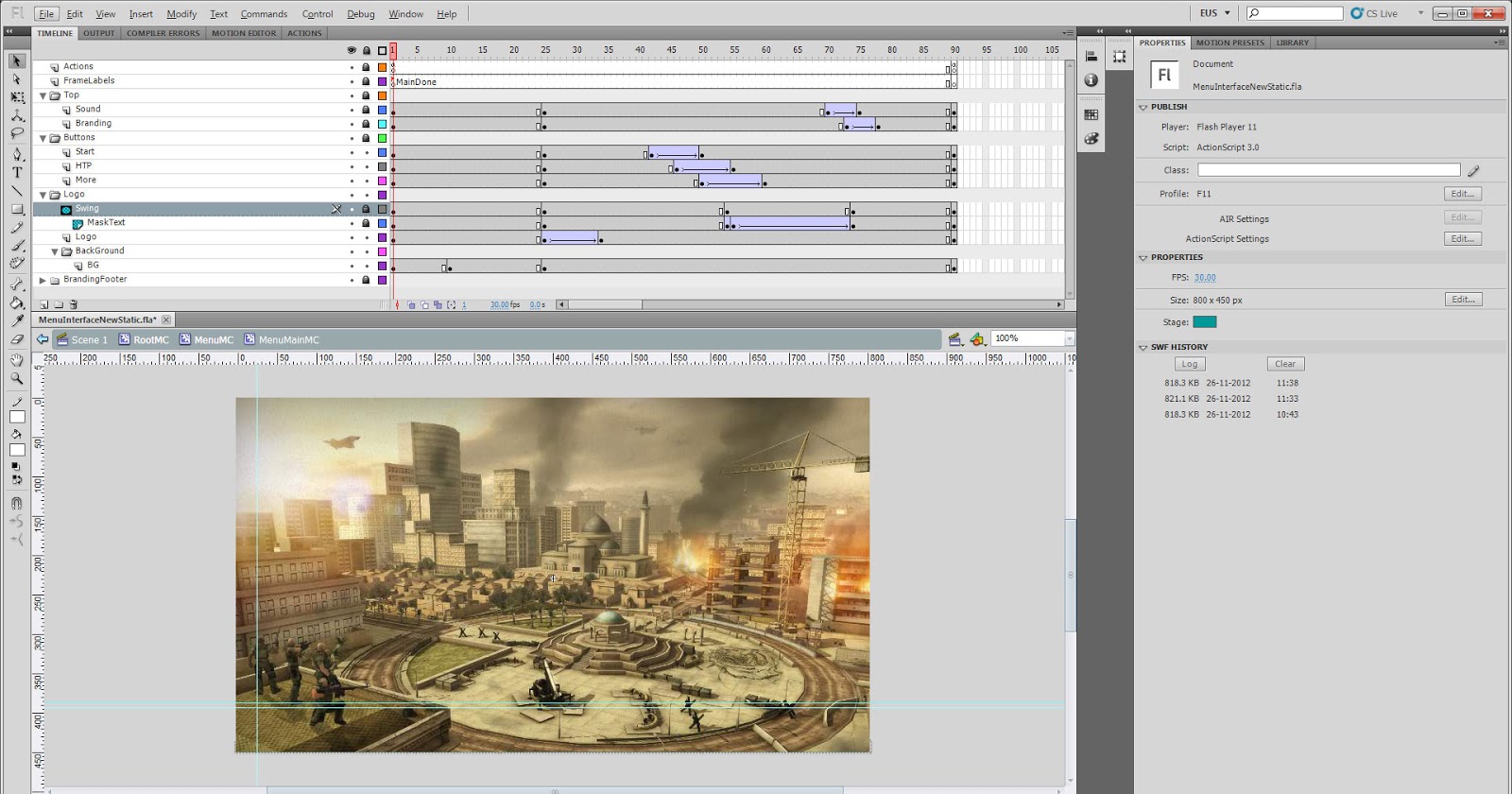
I also changed some small things in the main menu, a small animation, adding the sniper team in the menu background, load screen and more!
Adding some menu animations to make it more complete. 

and here is how it looks like in flash.


Main menu frame 1


Main menu frame 52
I added some fade-ins,  scaling some things from huge to their normal size.
I also added a small logo animation, a highlight over the logo, what moves from left to right.
Its easily done in flash.  You need the  original text/logo etc, make a mask of that object and add a highlight symbol that animates from left to right! Done!!

You get to see that when the game is released!

Screenshot during test session

Oh, don’t bother the German text fields, we were testing the localization, so the game can be played in more than just one language.


Hails,
Eugène

vrijdag 23 november 2012

Owl-tastic

Bionic owl with gold plating

We're all in an exceptional good mood today here at Xform. Yesterday we won a trophy of a plastic bionic owl!! Ooh-Hooh! We won it at an event called the Dutch Game Awards which is the Oscar equivalent of the game-industry.....in Holland.

We got nominated in 3 categories: Traffic Slam 2 in the category Best Online Game, Red Bull Formula Face in the category Best visual Design and again in the category Best Advergame.

We got the award for Red Bull Formula Face in the category Best Advergame. The Owl now stands proudly in our office overlooking us and keeping an eye out for micewhich occasionally sneak in, let's hope it scares them away.

Red Bull Formula Face
Formula Face is perhaps one of the lesser known Xform game, for a change it's not an action-packet driving or shooting game but a rather casual kart racer in a cardboard paper style.

To get the most out of this game you have to play it with a webcam which makes it possible to control your kart by moving your head and making funny faces.
Spread around the tracks are camera pick-ups which take a snapshot from the player's face in action. These snapshots can be shared on your Facebook account.
You can even print a cardboard cutout model of your avatar and kart! It's a fun little game which can be played herePlease note this game is best played in Internet explorer.

Currently we're having a lot of games in development and I can tell you some of them are very special, let's hope our owl will have a new friend next year.

Matt

maandag 19 november 2012

Fresh snow


Hello everyone!

Today I want to give you guys a quick update about our new stunt game.

Last week we made some decisions about the lighting. In all previous builds of the game we used Unity's lightmapper to bake our lighting. I did this because it was a quick solution to get some baked lighting in. However, we have specific reference images to hold on to. The unity lightmapper is very nice and yes, can give you very good looking results. But in this case, there are very specific colors we want the shadows and shading to be. Therefor we decided to go back to the old fashioned way, baking the lightmaps in 3dsmax.

This meant several things had to be done manually. Such as the unwrapping of the second UV channel. Unity does this for us, which is nice. However again, gives us less control on specific adjustments such as controlling the texel size per poly. This image shows what I mean:

If you look closely you can see that the center of the road ( what is on the screen all the time) has more UV space, and thus, more resolution which gives sharper shadows. The outersides of the track don't need as much resolution, because they never end up being on screen that big. This is not possible to control in Unity out of the box. You're only able to change the texel size per object, not by poly.


The specific colors of the lightmaps are done using gradient maps in photoshop. Gradient maps give accurate color control according to the greyscale value of the underlaying color. Using these gradientmap colored lightmaps in combination with a unlit lightmap shader in unity, we get the exact colors we want.


-Joep