maandag 26 november 2012

Cross your t’s and dot your i’s!!


Hey everyone!

At the moment we are busy with finalizing the Sniper game! Testing the game, tweaking the waves of enemies, amount of money and experience that can be earned, making it all shiny and more awesome!!

Last couple of days I did alot of tweaking in the interface and menu, 
checking text fields, duration  of animations, etc.

I also changed some small things in the main menu, a small animation, adding the sniper team in the menu background, load screen and more!
Adding some menu animations to make it more complete. 

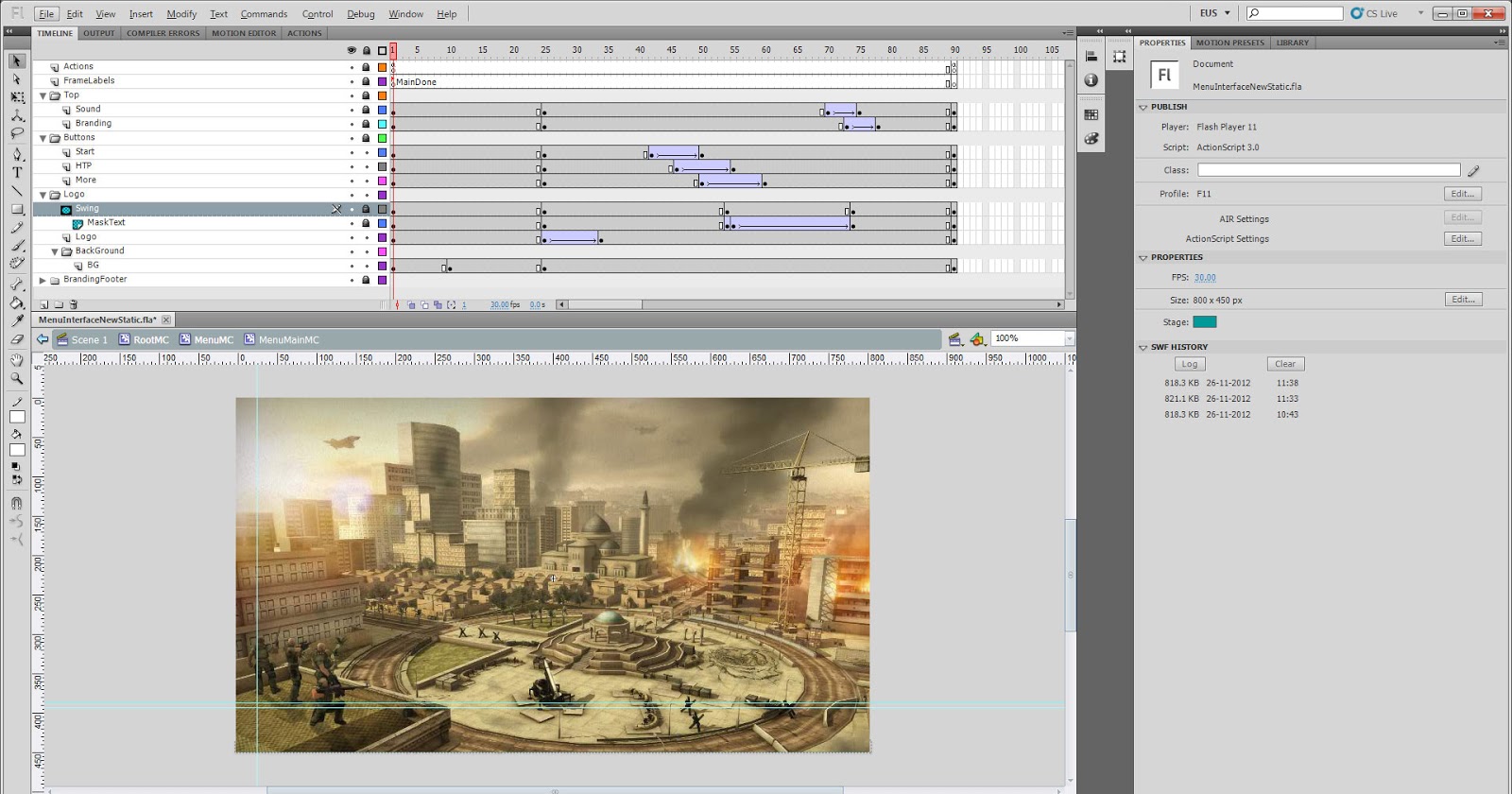
and here is how it looks like in flash.


Main menu frame 1


Main menu frame 52
I added some fade-ins,  scaling some things from huge to their normal size.
I also added a small logo animation, a highlight over the logo, what moves from left to right.
Its easily done in flash.  You need the  original text/logo etc, make a mask of that object and add a highlight symbol that animates from left to right! Done!!

You get to see that when the game is released!

Screenshot during test session

Oh, don’t bother the German text fields, we were testing the localization, so the game can be played in more than just one language.


Hails,
Eugène

vrijdag 23 november 2012

Owl-tastic

Bionic owl with gold plating

We're all in an exceptional good mood today here at Xform. Yesterday we won a trophy of a plastic bionic owl!! Ooh-Hooh! We won it at an event called the Dutch Game Awards which is the Oscar equivalent of the game-industry.....in Holland.

We got nominated in 3 categories: Traffic Slam 2 in the category Best Online Game, Red Bull Formula Face in the category Best visual Design and again in the category Best Advergame.

We got the award for Red Bull Formula Face in the category Best Advergame. The Owl now stands proudly in our office overlooking us and keeping an eye out for micewhich occasionally sneak in, let's hope it scares them away.

Red Bull Formula Face
Formula Face is perhaps one of the lesser known Xform game, for a change it's not an action-packet driving or shooting game but a rather casual kart racer in a cardboard paper style.

To get the most out of this game you have to play it with a webcam which makes it possible to control your kart by moving your head and making funny faces.
Spread around the tracks are camera pick-ups which take a snapshot from the player's face in action. These snapshots can be shared on your Facebook account.
You can even print a cardboard cutout model of your avatar and kart! It's a fun little game which can be played here. Please note this game is best played in Internet explorer.

Currently we're having a lot of games in development and I can tell you some of them are very special, let's hope our owl will have a new friend next year.

Matt

maandag 19 november 2012

Fresh snow


Hello everyone!

Today I want to give you guys a quick update about our new stunt game.

Last week we made some decisions about the lighting. In all previous builds of the game we used Unity's lightmapper to bake our lighting. I did this because it was a quick solution to get some baked lighting in. However, we have specific reference images to hold on to. The unity lightmapper is very nice and yes, can give you very good looking results. But in this case, there are very specific colors we want the shadows and shading to be. Therefor we decided to go back to the old fashioned way, baking the lightmaps in 3dsmax.

This meant several things had to be done manually. Such as the unwrapping of the second UV channel. Unity does this for us, which is nice. However again, gives us less control on specific adjustments such as controlling the texel size per poly. This image shows what I mean:

If you look closely you can see that the center of the road ( what is on the screen all the time) has more UV space, and thus, more resolution which gives sharper shadows. The outersides of the track don't need as much resolution, because they never end up being on screen that big. This is not possible to control in Unity out of the box. You're only able to change the texel size per object, not by poly.


The specific colors of the lightmaps are done using gradient maps in photoshop. Gradient maps give accurate color control according to the greyscale value of the underlaying color. Using these gradientmap colored lightmaps in combination with a unlit lightmap shader in unity, we get the exact colors we want.


-Joep

vrijdag 9 november 2012

Dirt Racer

Hi everyone!

After a long time it´s time for something new! I´ve been working on a sniper game for a long time and since that game is in test phase I got something new!
Like most of you know, we at Xform like to make racing game since we, of course, are the best in make those games. So why not make another one!


The project just started 3 weeks ago so we are working towards an alpha release. It´s very important to create good basic gameplay for the alpha, because after the alpha we focus on more content!


In the last 3 weeks I've been working on the basics of the game! We will be viewing the game in birdview so we need some changes to our camera and car behavior. It´s very important to make these mechanics good since we will be controlling the car and camera is following it. When that is finished we need to create some AI! The AI can use the player script for now but less Rays to cast and less check for collision and such. But for now this will do. :)
It will be very important to tweak it very good since we got some physics and lots of AI driving, so we need optimal performance!

Next to driving, camera and physics we need some extra objects... Something to avoid and things to collect like obstacles, pickups, hazards, etc. This is not something that takes long but will if we add to much in the beginning.
 
 
So now you can drive against AI, avoid obstacles, look for pickups and drive through hazards.
With a nice basic menu/interface and some sounds we got ourselves a nice alpha release!
Thats all about our new project!

Greetings,

Michael

woensdag 31 oktober 2012

Managing collisions

Dear readers,

Today I'd like to talk about collisions between objects in physics and how to manage them. Since we finished 'Downtown Drift' (which is now online here and you should definitely play: http://www.a10.com/racing-games/downtown-drift) we've been working on our next game involving lots of cars, explosions and wrecking. During the development of our next game performance became an issue. This was mainly due to there being too many physic objects checking for collisions with other physic objects. In 'Downtown Drift' this wasn't a problem as there really wasn't a lot of collision going on, just collisions between a couple of cars and the street mainly.

The way I solved this was by creating more layers. In Unity each game object is on a certain layer. Layers are basically a way to group your game objects. Certain functionality can be applied on one or more layers. For instance cameras can be made to only render some layers and not others. Collisions can be controlled with layers as well. Unity allows us to decide which layers should have collision with other layers using the layer collision matrix shown below.


The 'Layer Collision Matrix' in Unity
So instead of putting all game objects on the same layer which would cause collisions to be checked against every game object (that is also a physic object, i.e. a game object with a rigidbody and a collider component), I create multiple layers and set which layers should collide and which shouldn't. Of course this will in most cases affect the gameplay. Although it would be awesome if everything would just collide with everything, it just isn't worth it when your game starts running at 5 frames per second.


The destructible layer with which the player can collide, but that doesn't collide with traffic.

The traffic layer with which the player can collide, but that doesn't collide with destructibles.
-- Stijn

vrijdag 26 oktober 2012

Total Carnage

We're currently deep into testing and balancing Burnin' Rubber 5, which is quite a task, because it's such a big browser game. A few things have changed since the last versions where we mainly focused on scale. In the previous versions we created loads of tracks and even an open world in Burnin' Rubber 4. This time we're more focused on custom tracks and insane vehicles and weapons.

Besides the well known primary and secondary weapons we now have a new category... the special weapons! These weapons are linked to a bar which slowly fills. When this bar is full your opponents better stay out of your path (if they even can)!! The first unlockable special weapon is the Machinegun Roof Turret, which is exactly that: a machine gun turret attached to your roof.

I think it's better if you just move out of my way!

Imagine this: you're approaching the finish line but you're locked in between four bad-ass opponents. Your chances seem slim. You can try to get around them... but why not use your Machinegun Roof Turret?!
When activated you switch to your first person gun view while the AI takes the steering wheel. Now it's time to shoot those ##@*! out of your way!!!

Taste my special weapon!!! You like that, don't you?

This is just the first special weapon. Later on there are much crazier specials available.
Let the carnage begin!!!

Matt

woensdag 24 oktober 2012

More Guns!!!


Hey everyone!

This week we had a kickoff meeting of a new game!
No more machine guns, sniper rifle’s or that kind of stuff. Something new:
A kick ass racing game! Not sure If I can tell you much about it, so I keep it short.

Last couple of weeks I have been working on the sniper game, some small changes here and there, tweaking the waves etc etc. And making one of the last weapons!!

In the mean time the intern called Chris has been working on that particular race game.
We needed a vehicle, a race track and some new assets. So when we start developing the race game we got some good material to work with. He made a good start and we will definitely show everyone this later!

Back to the weapon! I started with searching for reference. I wanted to make a weapon different than the others,  with a more futuristic style.

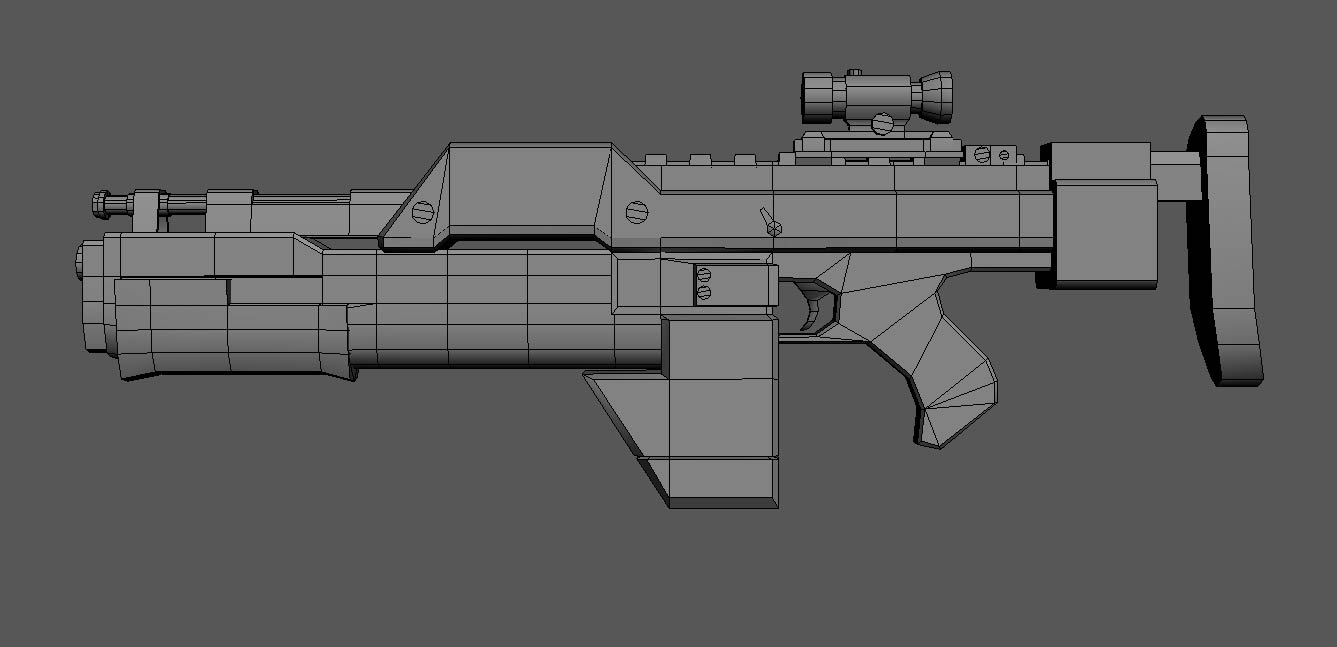
I started modelling the basic silhouette.


From there on I add more detail on the silhouette of the mesh, to define the different parts of the rifle. The barrel, the ammo box, the hand grip etc. 


After that I added some detail, a fancier barrel, some detail on the top of the weapon. I also added a scope. I want this weapon to be able to zoom. Would be looking odd if the weapon could zoom and didn't had a scope...


When the mesh is complete and the unwrap is done,  it's ready for a light map and a diffuse map.

Here the preview of the weapon with the diffuse map:


When all is done! The fun part begins: getting it into the game! And shoot with it! Ha!

Hails!
Eugene